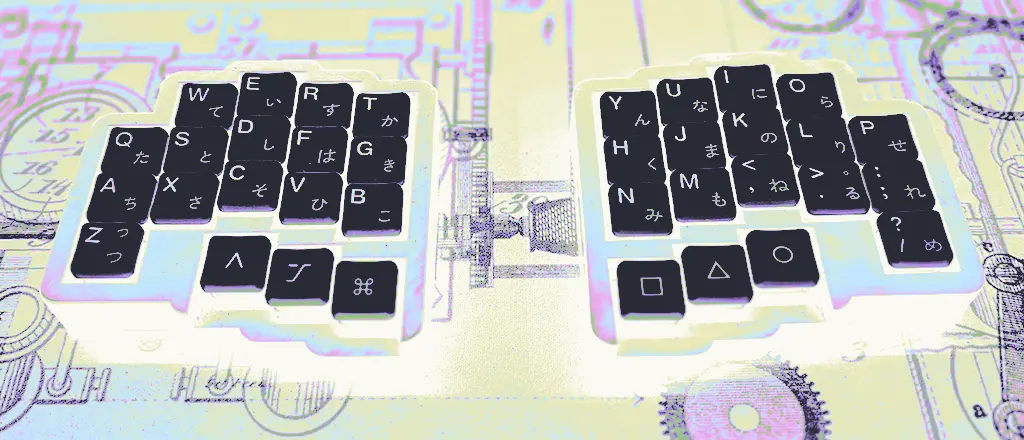
Inspired by (and following instructions from) YouTube videos by Ben Vallack and Christian Sellig, I have designed my own split, wireless ortholinear keyboard that I call the P2DI. I called it this because when looking at the key layout and squinting a little bit, it looks like a fist with six fingers, so the name is a reference to The Princess Bride.
Features
- Split
- Ergonomic
- Tenting
- Wireless
- Hotswapable
- Silent switches
- Dampening Foam
- Magnetic Closure
- QWERTY Layout
- Reversible PCB
Bill of Materials
- Choc Hotswap Sockets from Typeractive.xyz
- Nice!nano from Typeractive.xyz
- Battery from Typeractive.xyz
- Diodes from Typeractive.xyz
- Battery Jack from Typeractive.xyz
- Power Swtich from Typeractive.xyz
- Push Button from Typeractive.xyz
- Tenting Feet from Typeractive.xyz
- Switches from Lowprokb.ca
- Keycaps from chosfox.com
- PCB from JLCPBC
- Case from JLC3DP
- Magnets from McMaster-Carr
- Magnets from McMaster-Carr
Design Process (see Chirstian Sellig’s Video for a full description of the process)
- Layout, PCB design, and partial case design in Ergogen
- Finish PCB in KiCad (routing, making small adjustments to satisfy DRC)
- Design Case in Fusion 360 using drawings from Ergogen
- ZMK config writing
- ZMK firmware building in GitHub
Files:
- GitHub (Ergogen config, ZMK Files)
- Case (Fusion 360 Project)
Issues:
- The power switch and reset button are not accessible from outside the case
- The magnets are not able to hold the two halves together as intended
- The holes for the magnets often did not allow the magnets to go all the way in, leading to a gap between the switch plate and the bottom half.